
Your Private Tee Time Awaits, On Demand
You want a room that works every time you walk in. Not a pile of parts, not a project that still needs tweaking, and not a space that only works if everyone stands in exactly the right place. The best home golf simulator rooms feel simple because the planning is doing the heavy lifting.
That's where smart integration changes the experience. A single Josh.ai command can call up a golf scene, Lutron lights can shift to a hitting preset, the projector can power on, audio can route through Sonos, and the room can move from family lounge to practice bay without a scramble for remotes. That kind of control matters more than most homeowners expect. It's the difference between using the room often and using it occasionally.
Good golf simulator room design ideas also start with realistic space planning. A practical baseline is about 3.0 m wide, 5.0 m deep, and a ceiling around 2.8 to 3.0 m so you have room for a full swing, follow-through, and dependable tracking. From there, the room can become a dedicated training space, a refined media room, a garage conversion, or a compact setup designed around constraints instead of fighting them.
Homeowners usually don't need a commercial-style build. They need a room that fits their house, their habits, and the way the rest of their technology already works. These eight golf simulator room design ideas are built around that reality.
If you have a room you can commit to golf first, build a dedicated bay and stop compromising. This is the setup that feels right the fastest because every decision supports one thing: clear swing lanes, clean sightlines, and reliable launch monitor performance.
The room itself needs more than “enough space to fit a mat.” For many layouts, about 18 ft of depth works best, with the impact screen placed 12 to 16 inches off the rear wall, while radar launch monitors often need 7 to 9 ft behind the player plus roughly 8 ft of ball flight. In practice, that's why dedicated rooms outperform cramped bonus-room installs. They leave enough room for the screen, golfer, monitor, projector geometry, and safe movement around the bay.
A clean dedicated bay usually includes a fixed hitting area, a permanent enclosure or built-in impact screen, and a launch monitor aligned once and kept there. Pairing systems like TruGolf software with a properly mounted projector and a launch monitor from TrackMan, SkyTrak, or Foresight Sports creates the kind of setup that's easy to trust.
Practical rule: The less often you move components, the more consistent the room will feel.
I'd also leave space for what happens after the swing. That means a place to stand clear of the hitting zone, a route for ball pickup, and enough side clearance that left- and right-handed players aren't negotiating around furniture.
This is also where a clean network matters. If the room uses streaming content, software updates, control, and camera feeds, a hardwired backbone and strong Wi-Fi from Ubiquiti help the simulator behave like an installed system instead of a hobby rig.
A lot of the best golf rooms aren't golf rooms all day. They're family rooms, theater spaces, game rooms, and occasional practice bays. If that's your house, the right answer isn't forcing a permanent enclosure where it doesn't belong. It's building a flex room that converts quickly and still looks finished.
This approach works best when the infrastructure is permanent even if some of the simulator gear isn't. Prewire the projector location. Put power where the hitting area will sit. Run control wiring and network to the front of the room and the equipment location. Then the room can accept a portable launch monitor, movable mat, or retractable screen without looking temporary.
Most flex rooms fail because the furniture wins and the swing loses. Homeowners leave a sectional too close to the hitting area, put cabinets where the club path needs clearance, or choose lighting that looks nice for movies but washes out the screen during golf.
A better plan is to create clear room modes:
A modular room also benefits from one interface. If you're juggling separate projector remotes, app controls, and speaker settings, the room won't get used as often. Josh.ai, Lutron, and Sonos work well together here because the room can respond to a simple command instead of a startup routine nobody wants to remember.
Real-world example: a finished basement where the family watches movies most nights but rolls out a hitting mat on weekends. The permanent pieces are the screen, projector, wiring, network, and lighting control. The movable pieces are the monitor, mat, and some seating. That's a smart use of square footage, especially in a home where every room needs to earn its keep.
Basements make excellent golf simulator spaces if you design them as rooms, not as storage areas with a screen added later. The temperature is usually more stable, the room can be isolated from the rest of the house, and the build can lean into a club-lounge feel with better lighting, finishes, and acoustics.
The bigger opportunity is control. Basement golf rooms benefit from zoning the environment the same way you zone the AV. Humidity, airflow, and temperature all affect comfort, electronics, and how long the room feels good during longer sessions. That's why homeowners looking at a premium build should pay attention to the benefits of comfort zone control, especially if the simulator shares space with a bar, lounge seating, or theater features.
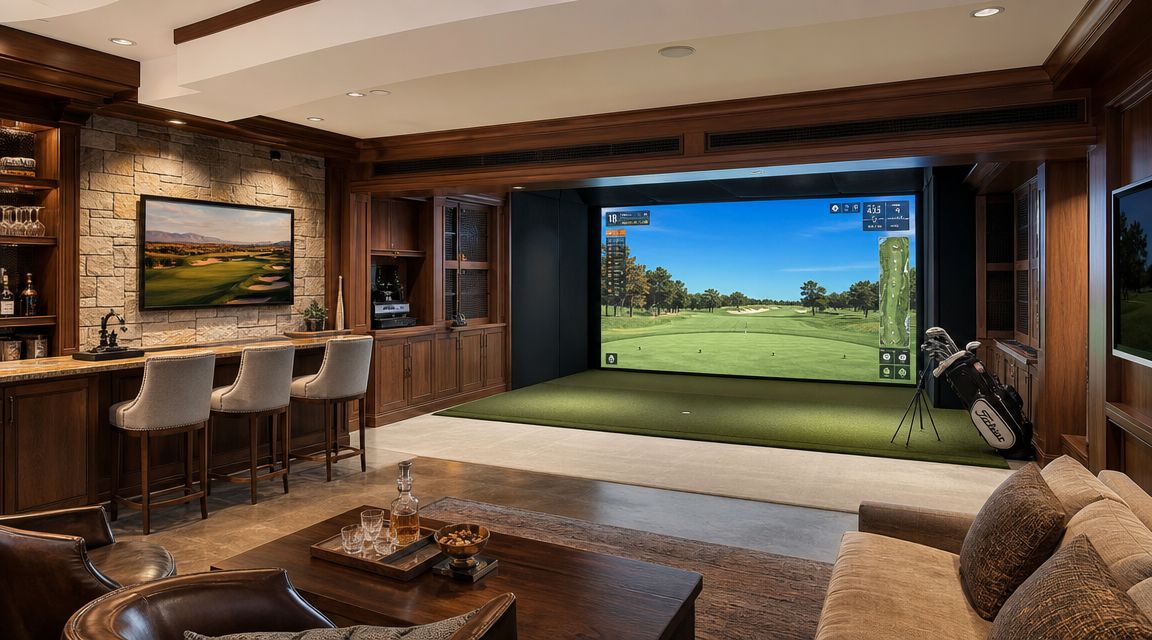
There's also a budget reality here. One U.S. market report says high-performance home installations represent 39.11% of overall U.S. simulator market value, while DIY home setups often land between $5,000 and $15,000 and luxury or commercial rooms can run $75,000 to $150,000+. That spread matters because premium rooms aren't just buying prettier finishes. They're buying better margins for ceiling height, cleaner projector placement, stronger acoustic treatment, more precise calibration, and more reliable control.
A strong basement simulator build usually includes hidden equipment storage, integrated lighting scenes, and quieter HVAC. It's also a good place to blend golf with other home entertainment systems. Sonos can handle distributed audio, Kaleidescape can support movie-night use if the room doubles as a theater, and Lutron shading and lighting can control glare without cluttering the design.
If you're comparing layouts or wondering what pushes a room from nice to fully integrated, this guide on how much a golf simulator can cost helps frame where the money tends to go.
A basement simulator should feel quieter, cleaner, and easier to live with than a garage build. If it doesn't, the room design missed the point.
Home AV Pros handles home-focused projects like custom home theater, new home builds, whole-home audio, exterior lighting and sound, and golf simulator integration. In a basement, that broader experience matters because golf is only one system in the room.
The garage is still one of the most practical places to build a simulator. It's separated from the main living space, it can handle tougher finishes, and it usually gives you a straightforward rectangular footprint. But a garage conversion only works well if you treat it like an actual interior project.
Start with the shell. Insulation, temperature control, and electrical capacity need attention before you worry about launch data or image quality. If the garage gets too hot, too cold, or too damp, the room won't be comfortable enough to use consistently. The same goes for ventilation. This overview of signs of poor ventilation in a house is worth reviewing when you're converting a space that wasn't originally designed for extended occupancy.
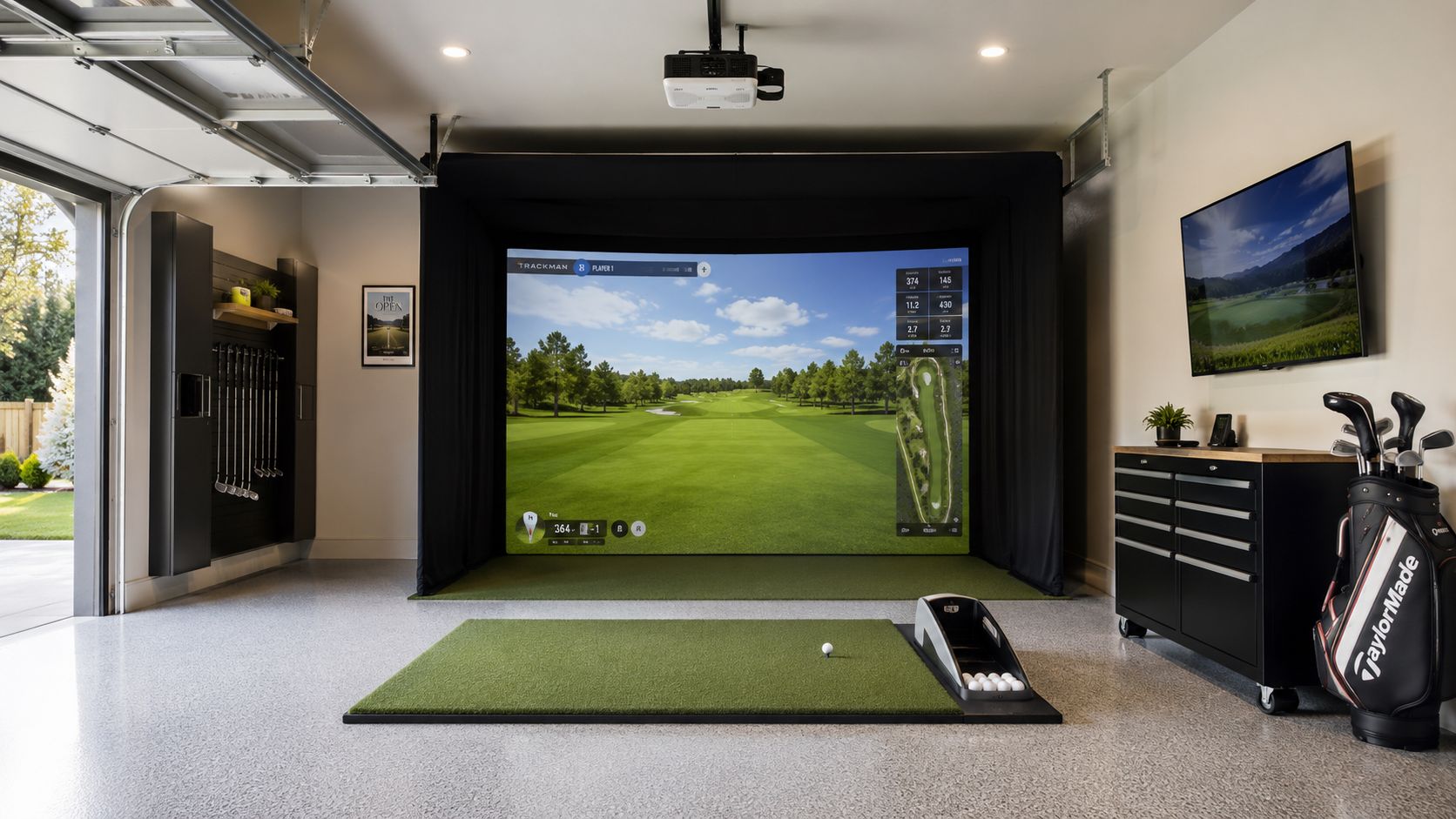
Garage floors expose weak planning fast. A slick slab, uneven transitions, or a thin mat will make the whole setup feel temporary. Better conversions use durable flooring, quality turf, and a hitting area that stays in one exact location.
A ball return can also be worth it in a garage because the room tends to support repetitive practice. If the golfer is hitting often, a smooth collection path keeps the session moving and reduces wear from balls bouncing into corners or under storage cabinets.
This room style is ideal for homeowners who want a serious practice space without giving up finished living space. It's also one of the easiest ways to separate simulator noise from bedrooms and main gathering areas.
Friday night starts as a clean media lounge. One voice command drops the hidden screen, shifts the Lutron lighting to a low-glare hitting scene, powers the projector, and routes Sonos audio for background music instead of full theater volume. The room changes function in seconds because the automation was planned with the construction, not added after the fact.
That approach matters in design-forward homes. A simulator in a lounge has to protect the look of the room while still giving the golfer proper sightlines, safe swing clearance, and reliable image alignment. Josh.ai is especially useful here because it can trigger a room-wide sequence without handing the homeowner three remotes and an app folder full of workarounds.
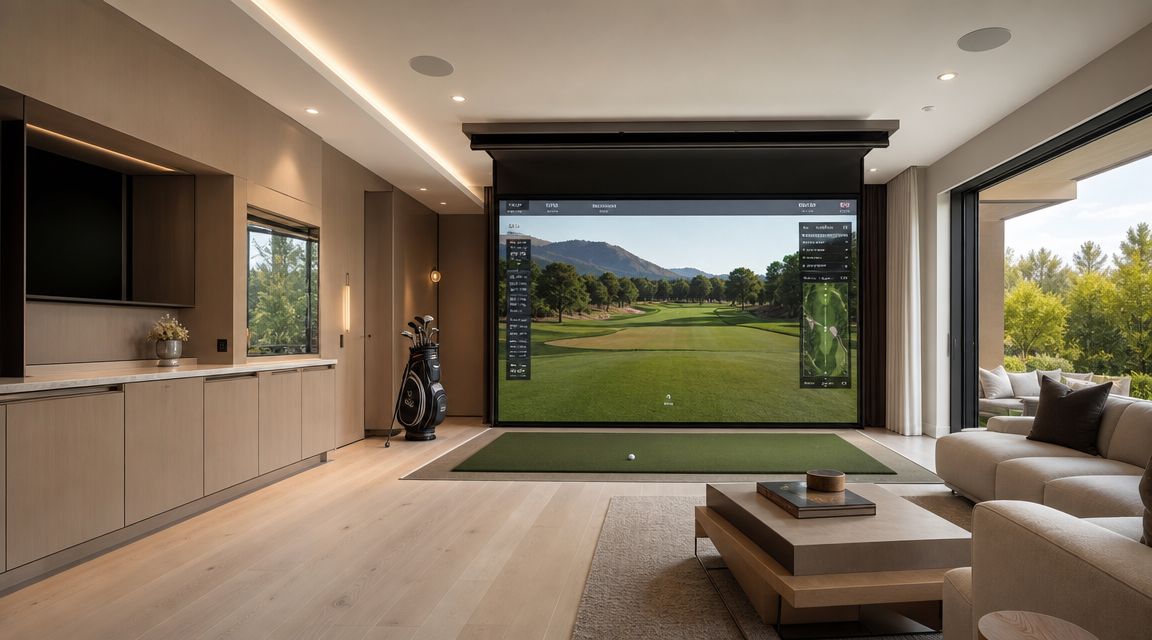
The trade-off is simple. Every decorative ceiling beam, wall sconce, floating cabinet, and deep built-in has to earn its place. In lounge-style simulator rooms, finished details often steal more usable swing space than homeowners expect, especially around the follow-through zone and projector path.
I see the same mistake often. Homeowners approve the millwork and paint schedule first, then try to hide a projector, impact screen, speakers, control keypads, and source gear after drywall is closed. That usually leads to visible cables, poor projector placement, light spilling onto the screen, or access panels in the wrong place.
A better plan starts with infrastructure. Run power and low-voltage wiring where the projector, automation hardware, and concealed AV rack need to live. Coordinate recessed fixtures so they light the seating area without washing out the image. Use impact-rated finishes that match the room instead of making the hitting wall look like a commercial cage.
For projector placement, throw distance, and image sizing, this guide to golf simulator projector setup gives a useful baseline before finish selections are locked in. Home AV Pros often coordinates that projector plan with lighting, shading, distributed audio, and control, which is what makes a lounge simulator feel intentional instead of improvised.
Early layout work helps too. Room Sketch 3D planning is a practical way to test seating depth, screen concealment, and traffic flow before a cabinet shop starts building around the wrong dimensions.
In this kind of room, visible clutter usually points to a design coordination problem, not an equipment problem.
Most homeowners don't need a commercial-style social golf lounge, but some do want a room that feels built for guests. If your ideal night includes friends, drinks, side betting, and sports on a second display, design around the group instead of treating seating as leftover space.
This kind of room works best when the golfer and spectators have separate zones. The hitting bay needs to stay visually calm and physically clear. The lounge side can hold additional screens, bar seating, and casual furniture. If everyone has to cross the hitting lane to get a drink or see the score, the room starts to feel chaotic.
The simplest move is to split audio and display priorities. The simulator image gets the main front view. Auxiliary displays can show scoring, swing data, or the game on TV. Sonos is useful here because it can keep music and TV audio manageable across different parts of the room without turning the hitting area into a noise box.
A room like this also depends on reliable networking. Multiplayer play, software updates, streaming sports, and smart control all stack up quickly. Ubiquiti networking is a strong fit for that environment because it supports a clean installed system rather than a patchwork of extenders and consumer gear.
A good home social hub still feels residential. That means better finishes, cleaner cable management, and a furniture plan that serves the house when the clubs are put away.
Not every home simulator should feel like a lounge. Some should feel like a training studio. If the goal is improvement, the room has to prioritize consistency, visibility, and repeatable setup conditions over decorative extras.
That means stable lighting, fixed camera positions, dependable network access, and display placement that lets you see both ball data and swing video without turning away from the hitting area. The room should support repetition. Same mat position, same monitor position, same stance relationship to the screen.
A training-first room benefits from multiple information zones. The main screen carries ball flight and course visuals. A side display can show launch data or replay. A tablet or control interface can manage practice sessions and saved clips. The point isn't more screens for the sake of more screens. It's faster feedback.
The broader market supports this kind of investment. One industry summary says the global golf simulator market was estimated at $1.74 billion in 2024 and is projected to reach $2.90 billion by 2030, with a 9.4% CAGR from 2025 to 2030. For homeowners, the important part isn't the headline. It's what the growth signals: permanent residential installs are becoming a normal category, so it makes sense to design a real room rather than a provisional setup.
If you're comparing hardware for this kind of room, this guide to the best golf simulator for home is a practical place to start.
The training room should remove excuses. If the setup takes effort every session, serious practice usually fades.
This is also where an integrator can add value beyond the simulator itself. Camera placement, display routing, control programming, and reliable Wi-Fi all affect whether coaching and analysis feel effortless or frustrating.
Small-space golf simulator rooms are the hardest to get right because every inch has two jobs. The room has to support the swing, protect the finishes, limit sound transfer, and still function as part of daily life. In condos and apartments, neighbor impact matters as much as screen size.
That's why compact setups should start with constraints, not wishful thinking. One of the more useful gaps in current advice is acoustic planning for shared-home environments. A recent design guide notes that adding acoustic panels, thick turf with padding, and sealing door gaps can help reduce echo and limit sound leakage in simulator rooms, which is especially relevant for basements, garages, and rooms near bedrooms or neighbors in attached housing, as discussed in this piece on custom golf simulator room design visualizations.
In a condo, I'd rather see a restrained setup with good acoustics and smart storage than a forced full-room build that annoys neighbors and never gets used. Wall-mounted storage, compact mats, and carefully chosen launch monitors can make the room workable without trying to imitate a suburban basement installation.
This is also where mixed-use planning becomes essential. Existing guidance often jumps from minimum dimensions to decor, but the more practical question is how the room transitions between uses. That's the issue highlighted in this discussion of golf simulator room ideas for mixed-use spaces, especially where circulation, storage, and different golfer needs all compete for the same square footage.
For homeowners trying to make a small room viable, this page on golf simulator space requirements helps ground the decision before equipment is purchased.
Compact doesn't mean compromised. It means every choice has to be intentional.
A comparison table is useful only if it helps you choose the right room strategy. In real projects, the deciding factors are usually ceiling height, shared use of the room, lighting control, HVAC, and how far you want automation to go with platforms like Josh.ai, Lutron, and Sonos.
| Option | Implementation complexity | Resource requirements | Expected outcomes | Ideal use cases | Key advantages |
|---|---|---|---|---|---|
| Dedicated Simulator Bay with Launch Monitor Integration | Medium to high. Professional AV install, calibration, adequate ceiling height, and clean cable and power planning | High. Precision launch monitor, projector, impact screen, clear depth, and a healthy equipment budget | Accurate ball and swing data, immersive course play, repeatable practice sessions | Serious golfers, year-round home training, small teaching studios | High-precision data, reliable calibration, strong improvement tracking |
| Multi-Purpose Flex Room with Modular Simulator Setup | Medium. Retractable hardware, flexible mounts, storage planning, and repeatable setup positions matter | Medium. Portable launch monitor, retractable screen, modular hitting mat, and practical storage | Good golf simulation without giving up the room for everyday living | Families, rec rooms, bonus rooms, shared living spaces | Space flexibility, lower commitment, easier future upgrades |
| Luxury Underground Bunker Simulator with Climate Control | Very high. Structural coordination, waterproofing, HVAC zoning, acoustics, and lighting design all need to be coordinated early | Very high. Engineered HVAC, sound control, premium AV, finish carpentry, and higher construction budgets | Stable year-round play, protected equipment, and a polished entertainment environment | Luxury homes, private clubs, dedicated lower-level builds | Climate stability, equipment protection, premium guest experience |
| Garage Conversion with Professional Ball Return and Turf System | Medium. Insulation, power, flooring prep, heating, and durability details drive the result | Medium. Turf system, automated ball return, projector, impact screen, and garage-ready finishes | Durable practice space with realistic turf interaction and easier cleanup | Homeowners repurposing garages, coaches, frequent practice users | Good use of existing square footage, realistic turf feel, efficient ball retrieval |
| Modern Lounge Aesthetic with Ceiling-Mounted Projection and Hidden Screens | High. Custom integration, motorized elements, concealed wiring, and finish coordination are all part of the job | High. Motorized projector or lift, hidden screen solutions, custom millwork, and smart home control | Discreet simulator that preserves the room's design when golf is not in use | Design-conscious homeowners, formal living areas, media rooms | Refined appearance, concealed components, strong multiuse performance |
| Social Gaming Hub with Multiple Screens and Networked Play | High. Network design, synchronized video, control programming, and audio zoning get more complex fast | Very high. Multiple launch monitors, displays or projectors, distributed audio, switching, and larger room size | Multiplayer tournaments, spectator viewing, and a strong social experience | Entertainment venues, corporate spaces, large home recreation areas | High engagement, strong event potential, better spectator experience |
| Data-Driven Training Facility with Swing Analysis and Coaching Integration | High. Camera placement, software integration, data routing, and reliable network performance all matter | High. Pro launch monitor, high-speed cameras, training software, fast internet, and ongoing subscriptions | Detailed swing analysis, measurable progress, and support for in-person or remote coaching | Golf academies, teaching pros, serious amateurs | Detailed metrics, coaching workflow support, objective progress tracking |
| Compact Apartment or Condo Simulator with Space-Efficient Design | Low to medium. Space planning, short-throw projection, and noise control are the main constraints | Low to medium. Compact mat, tripod or small-footprint launch monitor, short-throw projection, and storage solutions | Functional simulation in a smaller footprint with fewer room modifications | Urban renters, condo owners, small bonus rooms | Space efficiency, lower cost, portability, easier removal |
The trade-off is straightforward. The more polished and automated the room becomes, the more coordination it needs between AV, lighting, HVAC, millwork, and control programming.
That is where an integrated design team earns its keep. Home AV Pros typically ties simulator performance to the rest of the room, so a Josh.ai voice command can drop shades, set a Lutron practice scene, power the projector, route Sonos audio, and put the simulator in the right mode without a stack of remotes or workarounds.
The best golf simulator room design ideas don't start with a launch monitor. They start with how you want to live in the space. Some homeowners need a dedicated training bay with fixed calibration and quiet acoustics. Others want a lounge that becomes a simulator with one voice command. Others need a garage build that feels durable, practical, and easy to maintain through Wisconsin winters.
That's why the room design matters as much as the hardware list. A good simulator room handles dimensions, projector alignment, lighting control, acoustics, HVAC, networking, seating, and storage as one coordinated system. If even one of those pieces is treated like an afterthought, the room usually feels harder to use than it should.
Smart home integration often yields a greater impact than expected. Josh.ai simplifies control. Lutron manages scenes and glare. Sonos keeps audio clean without overcomplicating the room. Ubiquiti supports the network backbone that the simulator, streaming, and control platform all depend on. If the room also serves as a media space, Kaleidescape can fit naturally into the design instead of competing with it. Outdoor-adjacent projects can even tie into broader property systems like Oelo lighting and outdoor audio when the home is being designed as a complete entertainment environment.
For homeowners, that whole-system approach is usually more valuable than chasing one premium component. A great projector in a poorly lit room won't feel premium. A strong simulator in a room with bad acoustics won't feel refined. A nice flex room without integrated control won't get used as often as it should.
Home AV Pros works across the kinds of projects that often overlap with a golf simulator room: custom home theater, new home builds, restaurants, home audio solutions, outdoor lighting, and sound. The strongest fit here is the home side of the business, where a simulator room can be integrated into a basement remodel, garage conversion, bonus room, or full new-construction smart home. That broader experience helps because a simulator room rarely lives alone. It shares lighting, networking, audio, control, and design language with the rest of the house.
If you want a room that feels clean, reliable, and easy to use, bring the AV, automation, and room planning together from the start. That's what turns an indoor golf setup into a space you will use year-round.
If you're planning a golf simulator room, Home AV Pros can help you design a home-focused setup that fits your space, integrates with your smart home, and works cleanly with lighting, audio, networking, and control from day one.

Copyright © 2026. Home AV pros. All rights reserved.