
You pull into the driveway after dark, arms full, phone in one hand, keys in the other. The porch is dim, the side path disappears into shadow, and the garage light only comes on after you've already stepped into the awkward part of the evening. That moment is why motion sensor lighting still matters.
A well-designed system changes the feel of a home before you even open the door. The driveway wakes up softly. The front walk becomes usable. The entry lights respond without feeling jumpy or theatrical. In a good smart home, motion sensing doesn't just switch on a bulb. It helps the house acknowledge that someone is arriving, moving through it, or settling in for the night.
The old view of motion sensor lighting was simple. Put a floodlight over the garage, point it at the driveway, and hope it doesn't fire every time a branch moves. That still exists, but it's no longer the whole story.
Today, motion sensor lighting sits inside a much broader category of home automation. One market report projects the global motion sensing lighting market will grow from USD 0.931 billion in 2025 to nearly USD 1.189 billion by 2034 (Business Research Insights motion sensing lighting market report). That matters because it reflects something homeowners already feel in practice. This isn't a novelty anymore. It's a standard lighting-control layer used across homes, commercial spaces, and industrial settings.
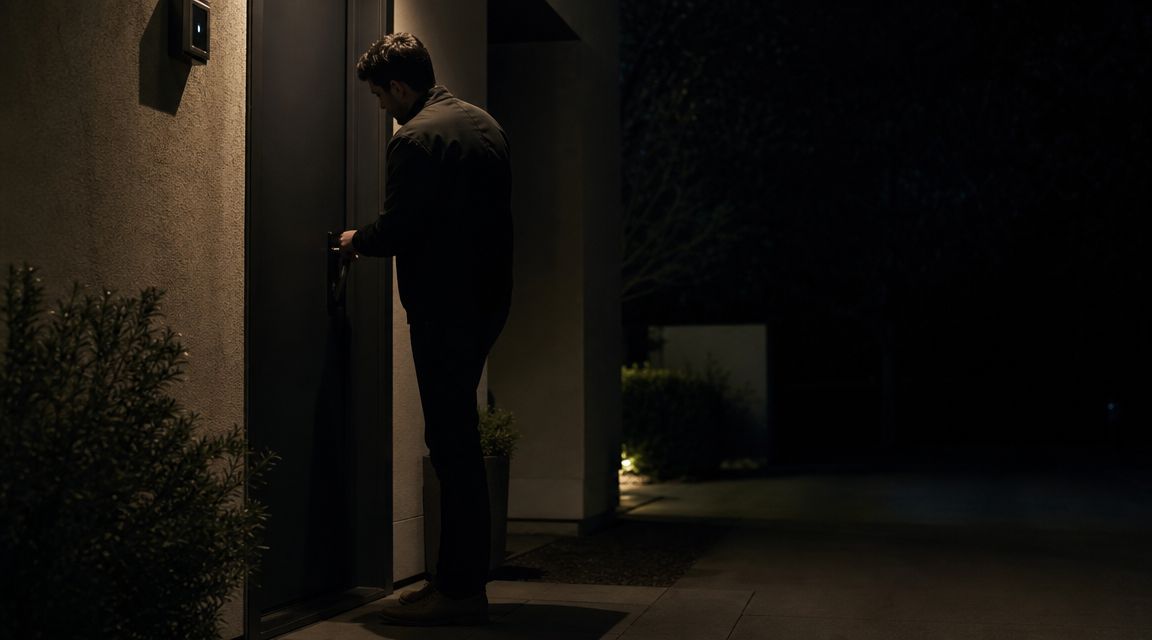
For homeowners building or upgrading a smart home, the better question isn't "Should I install a motion light?" It's "Where should motion sensing act on its own, and where should it trigger a larger scene?" That's the difference between a gadget and a system.
A smart home feels better when lighting responds with intent:
Motion sensing works best when it supports how you already move through the house, not when it forces you to think about the technology.
If you're looking at larger automation decisions, this broader guide to smart technology for the home is a useful starting point. Motion sensing becomes far more valuable when it's treated as one input in a coordinated system, not as an isolated fixture on the wall.
The easiest way to understand motion sensing is to stop thinking about the light and start thinking about the sensor. The fixture is just the output. The sensor decides whether the system behaves intelligently or annoys you.
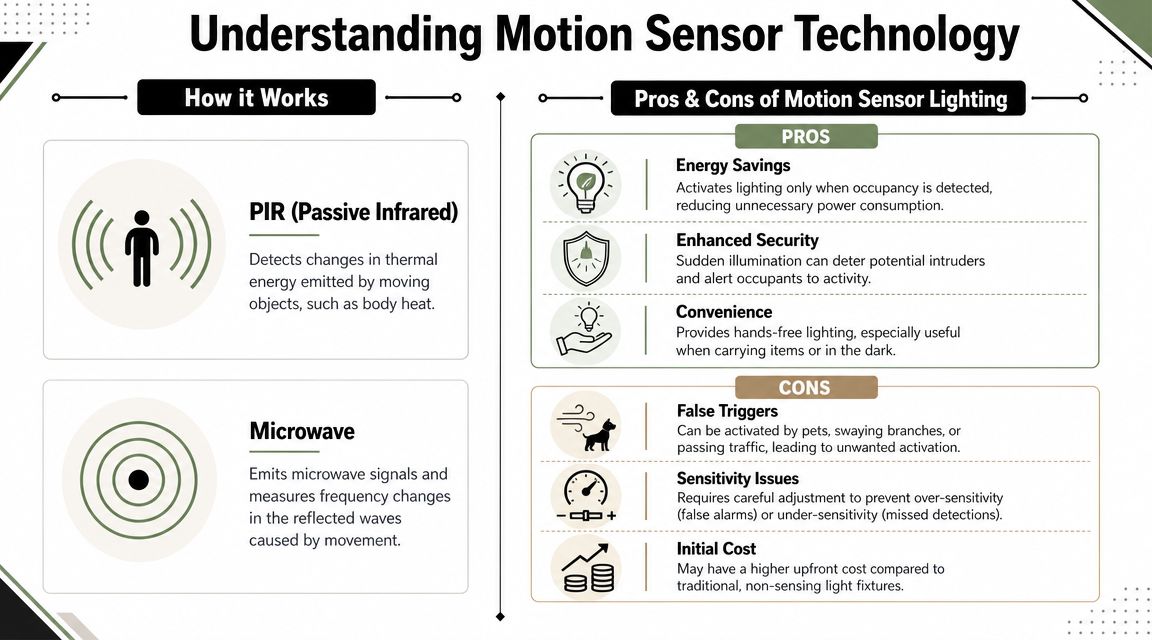
Passive Infrared, or PIR, is the most common sensor type. It works by detecting changes in infrared energy from warm bodies, which is why it performs well in everyday residential areas like hallways, closets, stairways, and outdoor paths (Beverly Hills Lighting on motion sensor lighting explained).
In practical terms, PIR is great when a person moves across the sensor's field in a predictable way. That's why it works well at a mudroom door, the base of a stair run, or a side yard gate. It's efficient, dependable, and usually the right first choice for home applications.
PIR does have limits. If the line of sight is poor, if the person sits very still, or if the area has odd geometry, response can feel inconsistent. That's where people sometimes assume "motion sensors don't work well," when the problem is usually the wrong sensor in the wrong place.
Microwave sensors operate differently. They actively sense movement and are often useful in spaces where shape, obstruction, or coverage complexity makes a simple heat-based approach less reliable. In larger or oddly shaped rooms, that can be an advantage.
But in homes, the more important upgrade is often dual-technology sensing. These designs combine two sensing methods, which helps reduce nuisance triggers from things like HVAC drafts, thermal noise, or small animals (learn more about smart home hubs and system coordination).
Practical rule: In a straightforward hallway, pantry, or powder room, PIR is usually enough. In an entry sequence, utility area, or mixed indoor-outdoor threshold where false triggers matter, dual-tech is often worth the extra planning.
A simple comparison helps:
| Space | Usually works best | Why |
|---|---|---|
| Hallway | PIR | Clear path, predictable movement |
| Closet or pantry | PIR | Short range, direct entry |
| Garage entry zone | PIR or dual-tech | Depends on airflow, pets, and door activity |
| Covered patio | Dual-tech | Better resistance to nuisance activation |
| Irregular room layout | Microwave or dual-tech | Better handling of complex coverage |
What doesn't work is choosing by marketing language alone. "Motion sensor" on a box tells you almost nothing. Important questions are coverage pattern, sensitivity, line of sight, and whether the sensor is being asked to do too much from one mounting position.
A basic motion light solves a basic problem. You walk by, it turns on. That's useful. It isn't the same thing as a smart home.
A significant leap occurs when motion becomes a trigger inside a larger automation system. Instead of one fixture reacting in isolation, the home interprets movement in context. A driveway sensor after sunset can cue a front exterior scene. A mudroom occupancy event can bring up kitchen pathway lighting. Late-night hallway movement can trigger low-level illumination instead of the same brightness you'd want at 6 p.m.
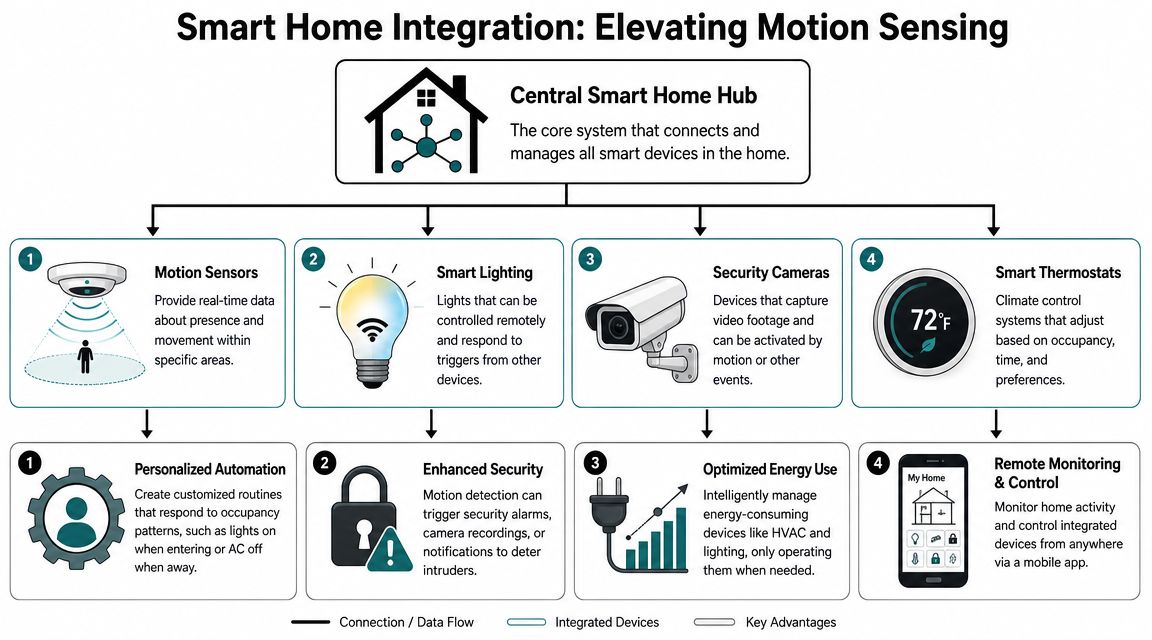
Platforms like Lutron and Josh.ai become far more interesting than standalone sensor switches.
With Lutron, motion sensing can feed into scenes instead of simple on-off behavior. A "Welcome Home" event might bring on entry lighting, illuminate a passage to the kitchen, and keep the rest of the house calm instead of fully lit. In a higher-end installation, that scene can also coordinate with automated shades and time-of-day logic so the response feels appropriate, not mechanical.
With Josh.ai, voice becomes the override and refinement layer. If the patio sensor has already brought up pathway lighting, a simple spoken command can extend that into entertaining mode without opening an app or reaching for a keypad. The key isn't novelty. It's reducing friction.
Later in the evening, the same system can behave differently. Motion in the upstairs hall might bring on just enough light for safe navigation. Motion near the theater room might leave adjacent lighting low so a film in Kaleidescape isn't interrupted. Outdoor activity can cue camera awareness through Ubiquiti while exterior and accent layers remain tasteful instead of security-flood harsh. If the property includes decorative exterior lighting such as Oelo, motion logic can complement those scenes rather than compete with them.
A helpful outside reference for anyone comparing system complexity is this guide to expert smart home device installation, especially if you're trying to understand where standalone device setup ends and coordinated automation begins.
In a well-planned home, motion sensing often works best when it controls more than one response:
Here's a good rule for luxury automation: if motion always causes the exact same reaction, the system probably isn't using enough context.
This is also the point where design discipline matters. More automation isn't always better. Some spaces should react instantly. Some should only confirm occupancy. Some should never trigger a bright scene unless a second condition is met, such as time of day or alarm status.
A custom integrator can bring that logic together across lighting, audio, networking, cameras, and control. In that lane, Home AV Pros handles whole-home systems that can include custom home theater, new home builds, restaurants, home audio solutions, outdoor lighting and sound, alongside platforms such as Josh.ai, Lutron, Sonos, Kaleidescape, Oelo, and Ubiquiti.
A short demo helps make the integration side easier to picture.
The best motion sensor lighting plans don't start with products. They start with moments. Where do you want the house to help you without being asked?
The most obvious place is the exterior, but most homes still get it wrong. A single bright flood over the garage creates glare, deep shadows, and a lot of wasted light. A better plan layers the response.
At the driveway, motion can wake up approach lighting. Along the walk, lower-level fixtures can provide direction instead of drama. Near the entry, the lighting can rise enough for visibility, keys, and faces at the door. In the backyard, motion is often best used selectively, such as along a side return, near gates, or in dark transition zones, while decorative outdoor lighting stays on its own scene logic. If you're planning those outdoor layers together, this guide on how to design landscape lighting is worth reviewing early.
Inside the house, hallway and stair applications tend to deliver the fastest improvement in day-to-day living. These are spaces people use repeatedly but don't occupy for long. That's exactly where occupancy-based lighting earns its place.
For late-night movement, the goal isn't brightness. It's orientation. A stair tread glow, a soft hallway level, or a gentle wash from an adjacent fixture works better than full-output overhead light when someone is half awake.
The best nighttime motion scene is the one that lets you get where you're going without feeling like the house just interrogated you.
Some of the most satisfying applications are the least glamorous:
These spaces don't need theatrical automation. They need reliability. That's why straightforward PIR coverage often performs well here, provided the sensor can see the path of entry clearly.
Motion sensing in primary living spaces takes more care. Family rooms, kitchens, and open-plan areas can be occupied without much movement. Someone reading, watching a movie, or working can confuse an aggressive occupancy strategy.
In those rooms, motion is often better used as a supporting input rather than the sole authority. It can contribute to scene selection, help with after-hours circulation, or confirm vacancy after a broader timeout. But if you expect one ceiling sensor to govern a large, active living space perfectly, frustration usually follows.
A useful way to think about room priority is this:
| Area | Best use of motion sensing |
|---|---|
| Front path and porch | Arrival and security support |
| Hallway and stairs | Safe nighttime passage |
| Pantry and closet | Hands-free convenience |
| Garage and mudroom | Task lighting on entry |
| Great room | Secondary input, not sole control |
Most complaints about motion sensor lighting trace back to placement, not hardware quality. A good sensor in the wrong spot will behave like a bad product.
Professional-grade fixtures are built around coverage geometry. Some security models offer 240° horizontal sensing, about 70 ft range, and adjustable delays such as 1, 5, or 20 minutes (Heath Zenith motion sensor light product details). Those specifications matter because they tell you the fixture can be tuned to the traffic pattern instead of left at a generic factory setting.
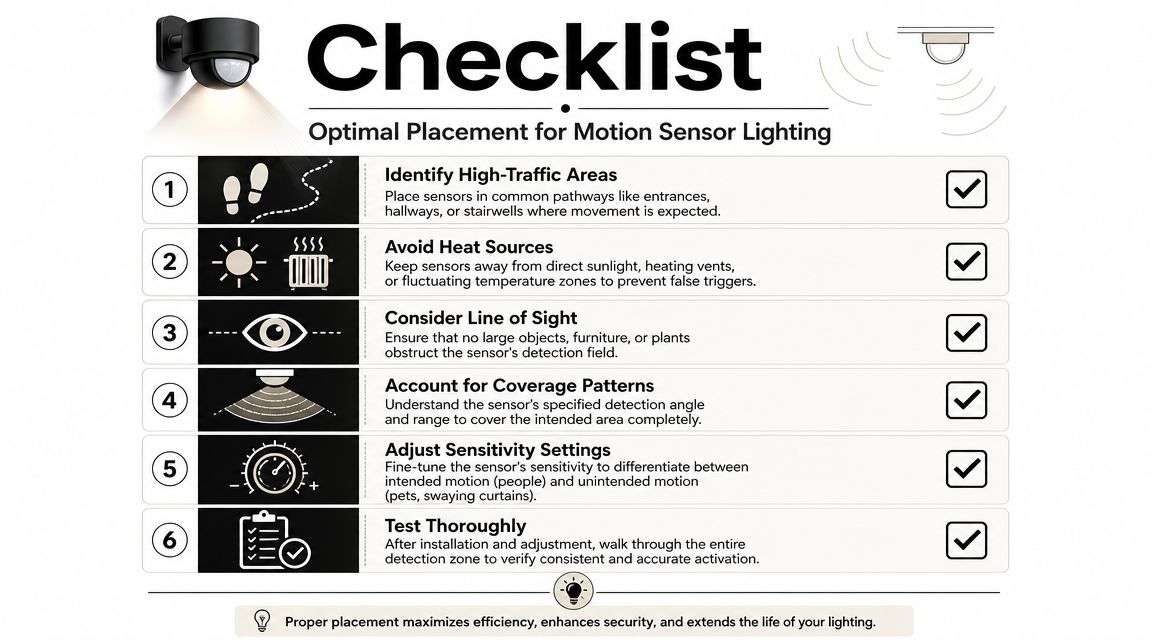
Many sensors detect movement more reliably when a person crosses the field rather than walking directly toward it. That's why a light mounted beside a path often responds better than one mounted at the far end aimed straight down the line.
If a homeowner says, "It only turns on once I'm already under it," that's usually a geometry problem. Re-aiming often fixes more than replacing.
A sensor doesn't know intent. It only knows change. That means bad placement can create a cycle of nuisance activations.
Watch for these trouble spots:
Time delay is a design tool, not a menu setting you ignore after installation.
A short delay can feel crisp in a pantry or powder room. The same short delay on a stair landing can be irritating. Longer delays reduce nuisance off-events but also keep lights running after the useful moment has passed. Placement and timeout always work together.
A sensor should be tuned to the room's rhythm. Fast passage spaces need one behavior. Pause-and-return spaces need another.
Before finalizing a location, check these in order:
For large or irregular areas, don't force one sensor to do the work of two. Two smaller, well-aimed zones usually outperform one oversized coverage pattern.
Some motion sensor lighting projects are perfectly reasonable to tackle yourself. Others look simple until they intersect with dimming compatibility, wiring constraints, scene programming, or network dependencies.
Battery-powered closet lights, plug-in fixtures, and a basic standalone exterior unit are usually straightforward. Hardwired lighting tied into scene control, architectural dimming, shades, voice control, and security logic is a different category. That's where planning matters more than the fixture itself.
A do-it-yourself approach usually fits when the goals are narrow and local:
If you're working with low-voltage outdoor runs, this overview on how to wire low voltage lighting helps frame the physical side of the work.
The case for professional design becomes stronger when the lighting has to behave consistently across rooms and time-of-day conditions. Settings matter a lot. One Better Buildings and DOE guidance document notes an office study where motion-sensor-controlled lighting saved 22% with a 30-minute delay and 32% with a 10-minute delay (Better Buildings wireless sensors guidance PDF). The lesson isn't that shorter is always better. It's that timeout settings change outcomes significantly.
In residential work, that translates directly to room-by-room tuning. A stair, garage entry, pantry, primary closet, and covered patio shouldn't all use the same delay logic. DIY installs often fail here because the fixture gets mounted, the defaults stay in place, and no one revisits how the space is used.
Professional installs also solve problems homeowners usually don't see at first:
| Issue | Why it matters |
|---|---|
| Dimming compatibility | Prevents flicker, misfires, or poor scene behavior |
| Sensor zoning | Keeps one area from waking up another unnecessarily |
| Control programming | Allows time-based and context-based responses |
| Finish coordination | Preserves clean aesthetics in visible spaces |
If you're building a new home or renovating multiple rooms at once, it's far easier to get this right during design than after drywall and trim are complete.
Good motion sensor lighting doesn't call attention to itself. It makes the home easier to use, safer to move through, and calmer after dark.
That's the progression most homeowners miss. They start by shopping for a motion light and end up realizing the inherent value is coordination. The porch doesn't just turn on. The entry sequence becomes more useful. The hallway doesn't just react. It responds differently at midnight than it does in the afternoon. The patio doesn't just flood with light. It can become part of an evening scene that respects the rest of the property.
The difference between basic automation and intelligent response comes down to three things: the right sensor type, the right placement, and the right system logic. Miss any one of those and the result feels clumsy. Get all three right and the technology fades into the background, which is exactly where it belongs.
For homeowners who want motion sensing tied into lighting scenes, audio, shades, cameras, and voice control without sacrificing aesthetics, professional design usually pays for itself in fewer compromises and better daily use.
If you're planning motion sensor lighting as part of a smart home, theater build, outdoor lighting upgrade, or whole-home automation project, Home AV Pros is a practical place to start. They work on integrated residential systems that can include lighting control, outdoor lighting, audio, networking, security, and custom AV, with design choices shaped around how the home is used.

Copyright © 2026. Home AV pros. All rights reserved.